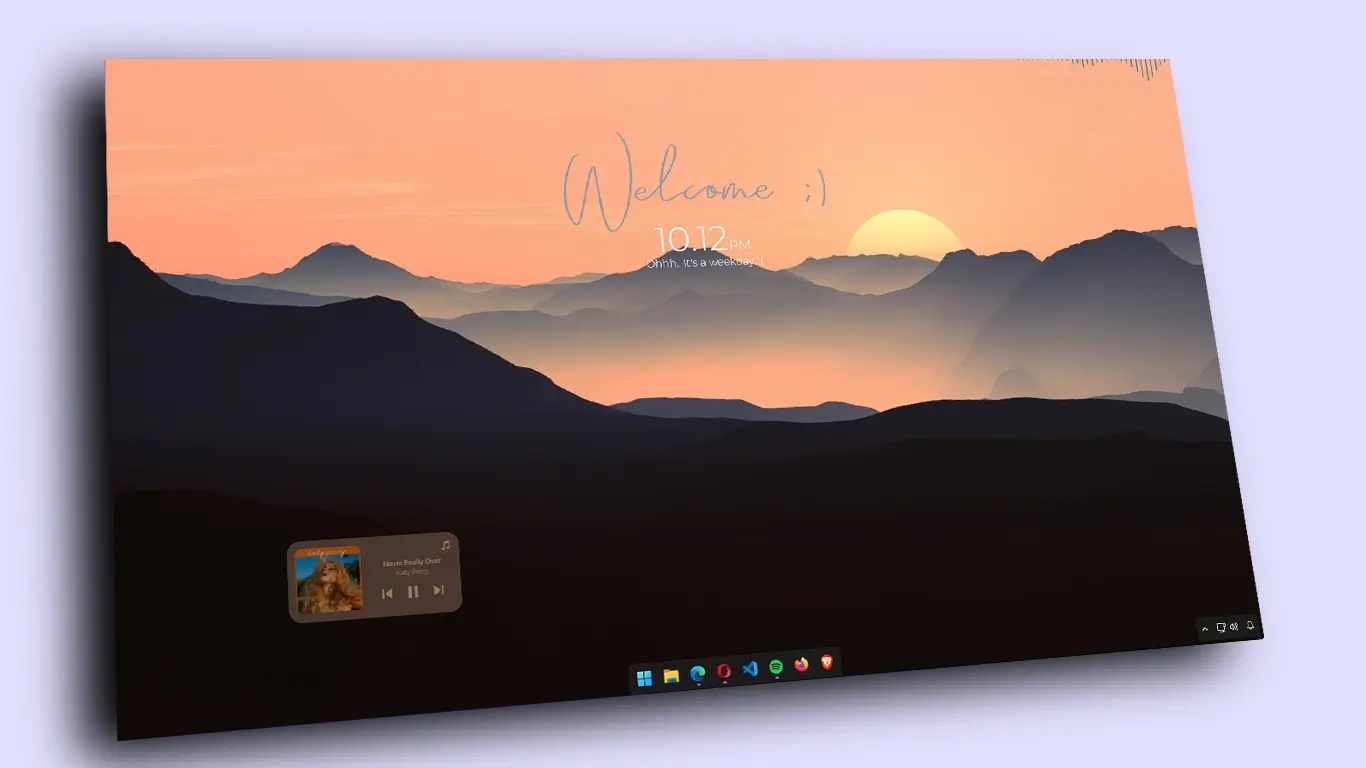
Clean and Aesthetic Desktop Theme
In this setup, we’re focusing on creating a clean, minimalistic, and aesthetic desktop for your Windows PC. This theme strips away clutter and distractions, leaving you with a sleek workspace that not only looks good but helps improve focus and productivity. Using a few simple tools, you can achieve an organized desktop that feels both modern and functional.
Download Theme File:
To create this clean and aesthetic desktop setup, the following resources were used:
Rainmeter
Windhawk
Theme File
What’s Included in the Theme File?
- Rainmeter Skins/Widgets
- Wallpapers
Customization Steps
- Customize your taskbar and desktop icons to align with the theme.
- Download the Theme file and the Necessary Resources that are required for the customization.
- Set the Wallpaper
- Watch the video for a detailed tutorial on configuring Rainmeter and Windhawk.
Conclusion
With Rainmeter and Windhawk, your desktop can be transformed into a sleek and aesthetically pleasing workspace. By removing unnecessary icons, hiding the taskbar, and applying a beautiful wallpaper, you’ll achieve a look that’s both functional and visually appealing. For full details on configuring everything according to the theme, be sure to check out the video. Enjoy your new, clean desktop setup!