Home / Cursor Skins / Vision Cursor For Windows

Vision Cursor For Windows

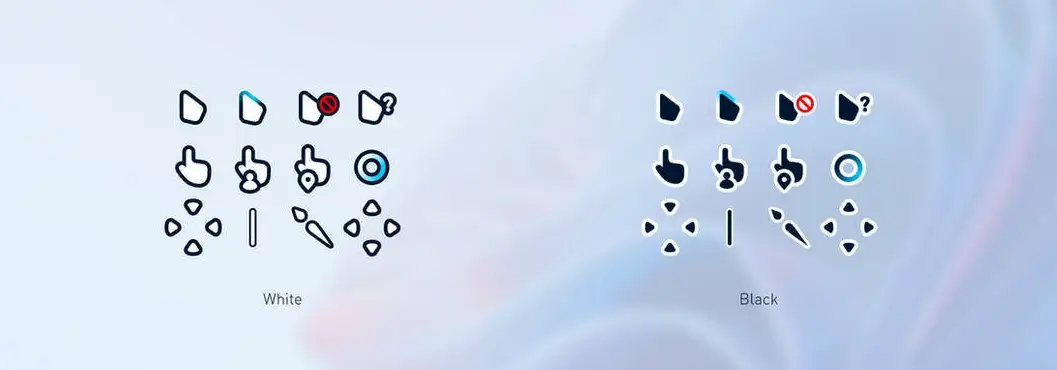
Ready to give your Windows desktop a modern makeover? Meet Vision Cursor – the perfect blend of Windows 11 aesthetics and effortless customization.

Vision Cursor Features:

Windows 11 Aesthetics:

  • Sleek design inspired by Windows 11, transforming your desktop into a stylish workspace.

Two Distinct Variants:

  • Choose Vision Cursor White for a clean and minimal look, or opt for the sophistication of Vision Cursor Black

File Variety for Your Convenience:

  • Enjoy the flexibility of high-quality PNG files for seamless integration and PSD files for those who love to personalize.

What You Get:

  • Vision Cursor White
  • Vision Cursor Black
  • PNG Files
  • PSD Files

Download Vision Cursor now and let your desktop reflect your unique style. Say goodbye to the ordinary and hello to a customized, sophisticated workspace!

Credits & Author: IDarques

How to Install Cursor Skins

Follow these simple steps to install your new cursor skin:

Download the cursor skin from the link below.

  1. Extract the downloaded ZIP file using WinRAR, 7-Zip, or Windows’ built-in extractor.
  2. Open the extracted folder, right-click on Install.inf, and select Install.
  3. Open the Mouse Pointer Settings using either of these methods:
    • Control Panel → Mouse → Pointers
    • Settings → Personalization → Themes → Mouse Cursor → Pointers
  4. Under the Scheme dropdown menu, select your installed cursor skin (for example, Vision Cursor) and click Apply, then OK.

Your new Windows cursor skin is now installed and ready to use!

💬 Comments 0

Add new comment

Discussion

No comments yet. Be the first to share your thoughts!