TextClock Rainmeter Skin
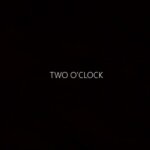
Don't strain your eyes struggling to decipher your digital watch or traditional clock when you can effortlessly check the time in a clear, black-and-white text...
Ratings are determined based on ease of use, functionality, customizability, aesthetics, and resource use.
1 / 3
Don’t strain your eyes struggling to decipher your digital watch or traditional clock when you can effortlessly check the time in a clear, black-and-white text format. Text watches are all about simplicity and precision. With this Rainmeter skin, you can easily determine the exact number of minutes elapsed since the hour began or the remaining minutes until the top of the hour. If simplicity and accuracy are your priorities for timekeeping, consider adding this fantastic Rainmeter skin to your desktop.

How to Install Rainmeter Skins
Follow these simple steps to install a Rainmeter skin on Windows:
- Download the Rainmeter skin from the link below.
- Install Rainmeter if you haven’t already.
- Open your Downloads folder and locate the downloaded .rmskin file.
- Double-click the
.rmskinfile (or right-click and choose Install) to install the skin. - Open the Rainmeter Manage window by:
- Right-clicking the Rainmeter icon in the system tray and selecting Manage, or
- Right-clicking the loaded skin and selecting Manage Skin.
- From the Manage window, load, unload, or customize the installed Rainmeter skin to match your desktop setup.
Your Rainmeter skin is now installed and ready to personalize your Windows desktop.
hi