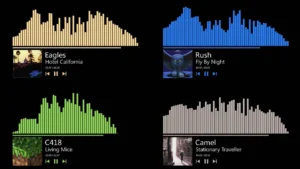
Introducing the “Double Sound Visualizer Rainmeter Skin” – a dual-layered audiovisual masterpiece for your desktop. This skin offers an extraordinary music visualization experience, taking your desktop customization to the next level.
With its double-layer design, this visualizer brings your music to life in a dynamic and mesmerizing fashion. Two distinct sound visualizations synchronize with your music, offering a captivating display of rhythm and sound levels. Whether you’re jamming to your favorite tunes or immersing yourself in a gaming session, the Double Sound Visualizer Rainmeter Skin adds an extra layer of excitement to your desktop.
Customization is at your fingertips as you can adjust its settings to match your wallpaper or set the mood for any genre of music. Elevate your desktop experience with this extraordinary visualizer skin, where sound meets style in perfect harmony.